# Call Queues
A call queue (formally known as an Agent Group), also known as automatic call distribution (ACD), is an account that routes incoming calls to a specific group of agents. Before connecting to an agent, callers are placed inside a queue, allowing agents to deal with incoming calls without losing other callers to busy signals or unanswered phones. While waiting, callers hear music and pre-recorded announcements. Call queues can be monitored using several monitoring methods.
Call queues are often found in offices that handle high-volume customer calls from callers who do not need to speak with a specific person but who require assistance from any of multiple people, like sales representatives and or support staff. Call queues have a wide range of features.
By default, agents are logged into the queue. They can log themselves in and out. While they are logged out, they are still agents of the queue and will show for example in reports, but the system will not route calls to the agent. When an agent puts herself on do-not-disturb (DND), this agent is logged in, however the system will also not route calls to the agent.
Agents are organized in pools. The agents in the primary pool are included unconditionally. The agents in the other pools are included when the condition for the pool is true. This makes it possible to add additional agents, for example when waiting times are getting too long or all the primary agents are logged out.
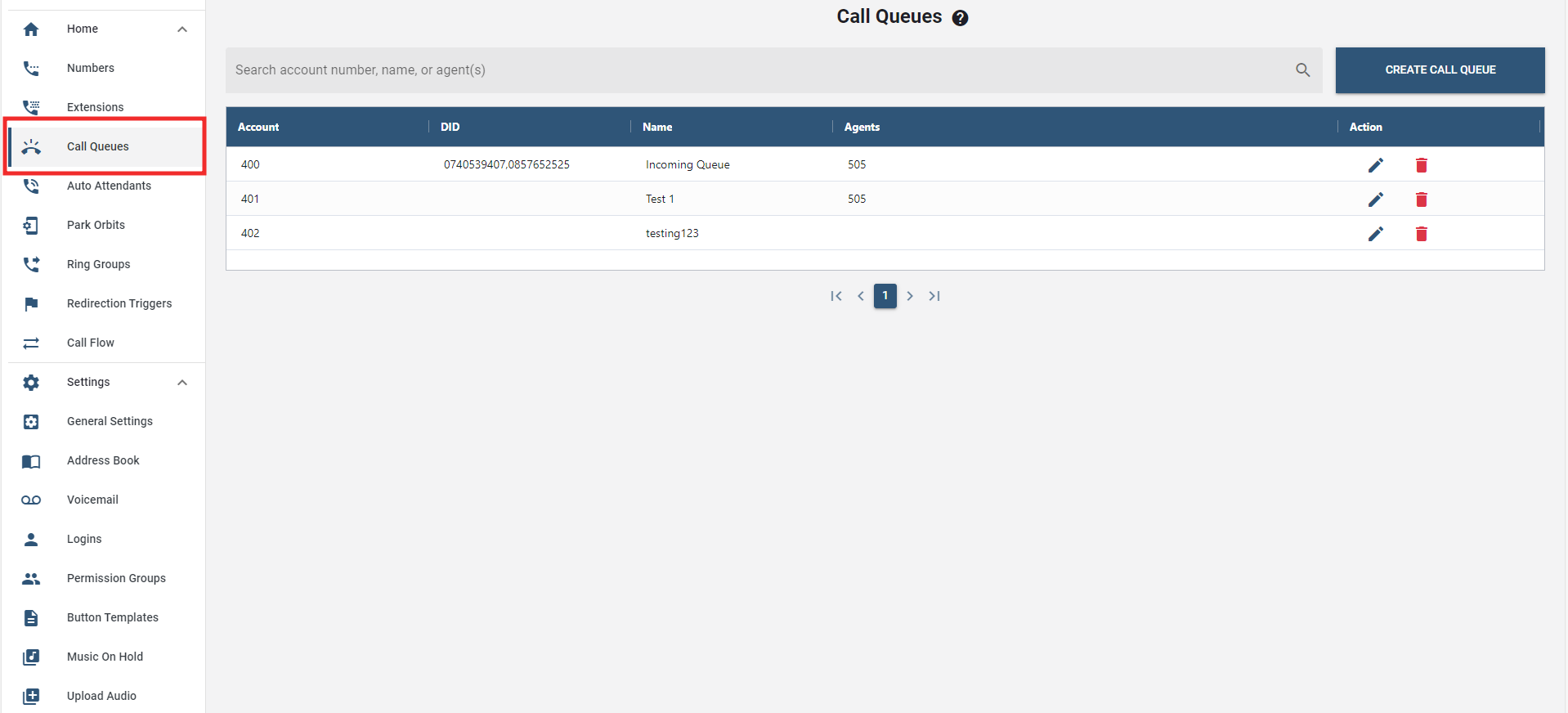
# Creating a Call Queue
- Select a tenant in the Link web interface.
- On the sidebar menus, select the "Call Queues" tab.
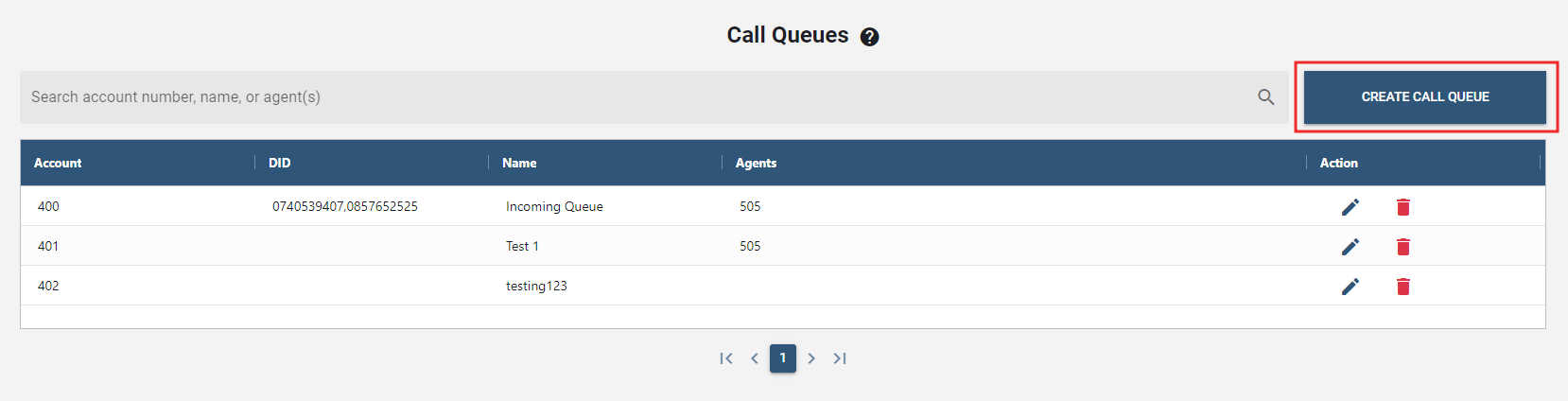
- Click the button to create a new call queue.
- In the Display Name field, enter a descriptive name for the new call queue.
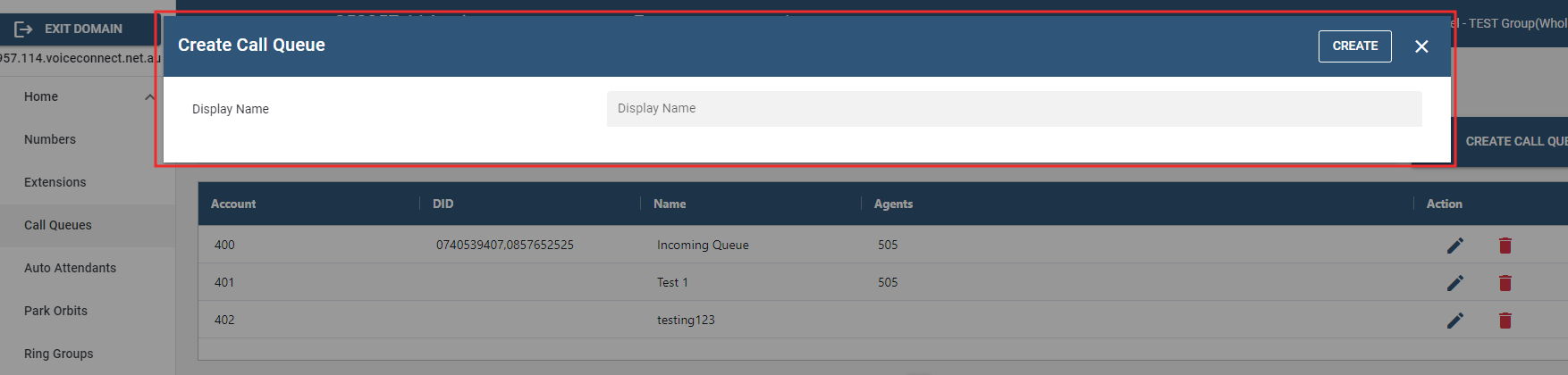 Account Number will be generated automatically upon creating a call queue.
 - Press . The call queue that have been created will be displayed in the call queue accounts list.
# Configuring Call Queue
- To configure a call queue, click the ""edit icon"" under the Action column.
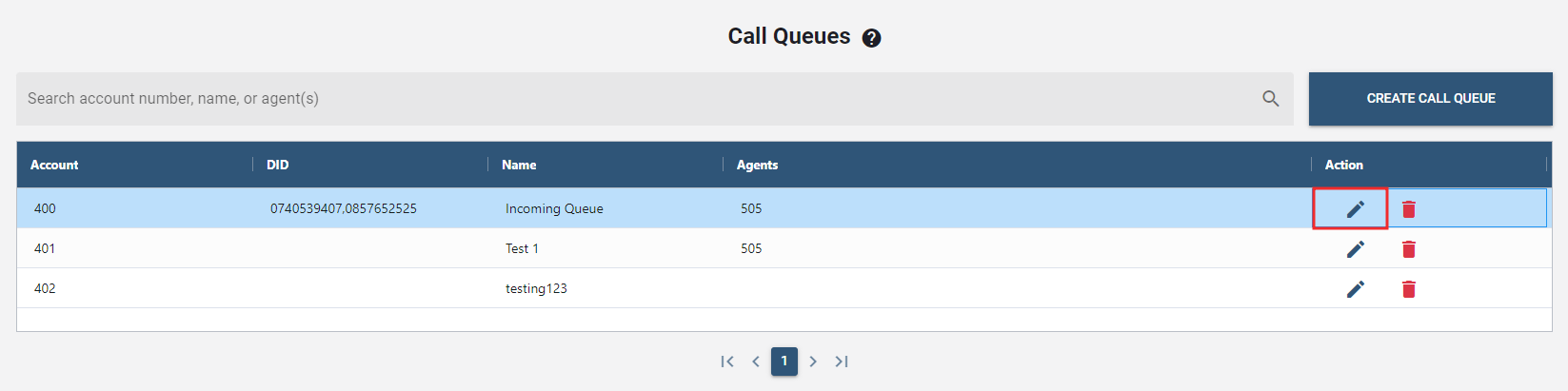
- Following that, a new window will pop up to configure the details.
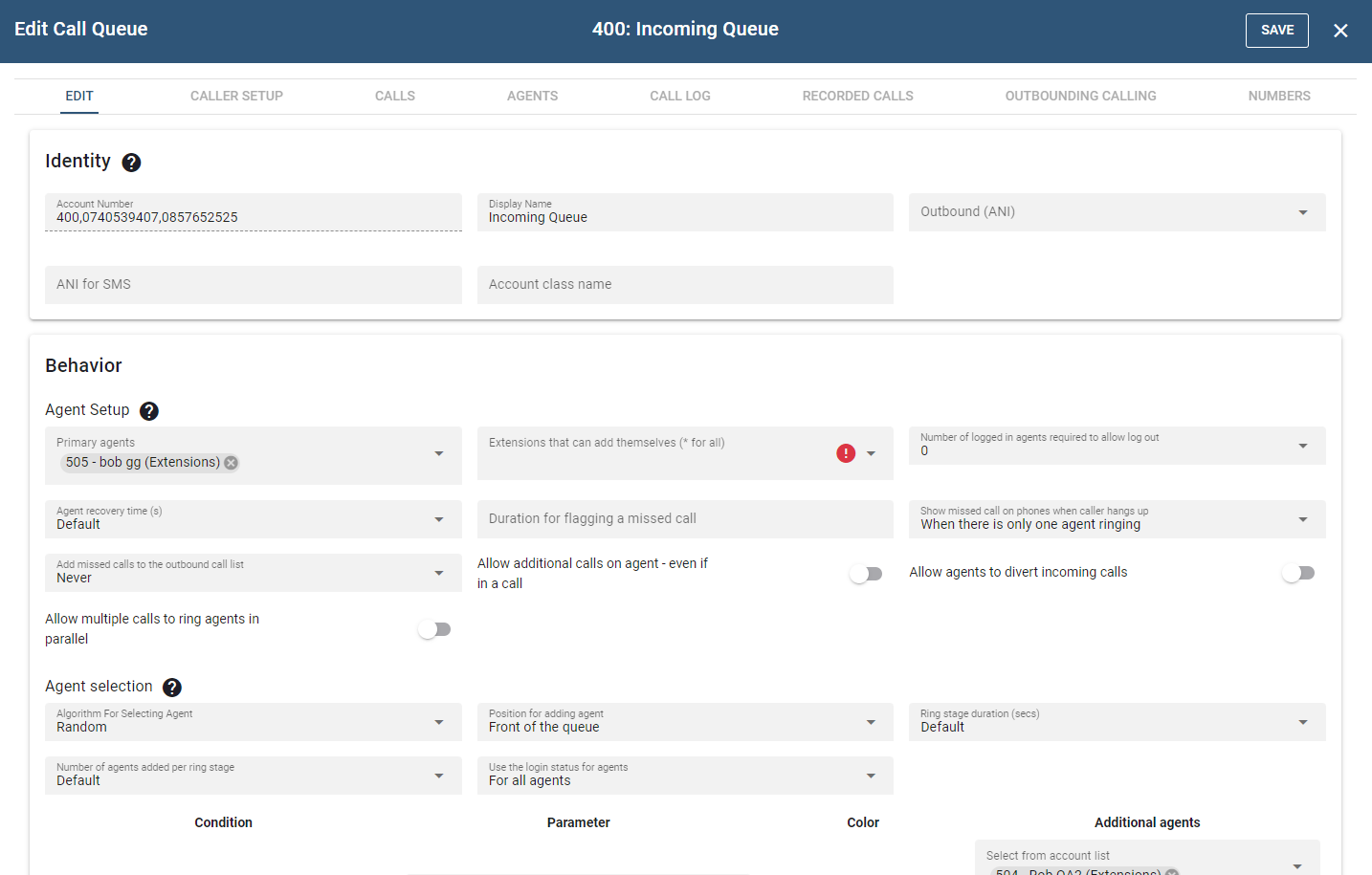
# Edit
# Identity
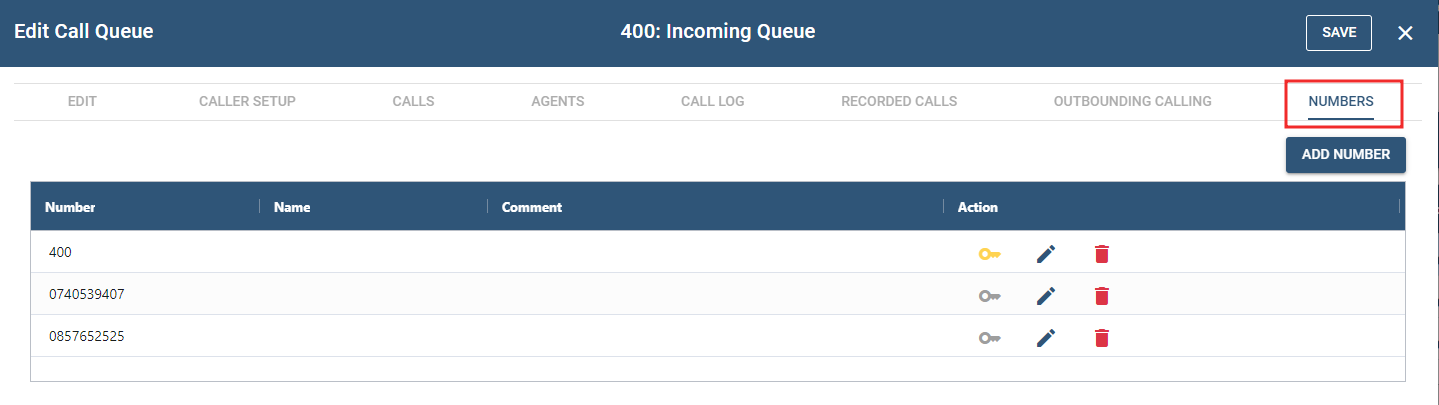
- Account Number(s): This field takes extension number(s) and/or DID number(s). The number of DIDs that can be entered into this field is unlimited. Please use a semicolon to separate the numbers.
- Display Name: The purpose of this field is to create an alias so that it will be easy to identify the Account among other Accounts.
- Outbound number (ANI): This field shows the outgoing ANI to the callee if an agent is logged into this queue when it dials out.
- ANI for SMS: With this feature the agents can show a different ANI when SMS is sent out to external numbers.
# Behavior
# Agent Setup
- Primary Agents: The primary agents which are always considered for routing incoming calls.
- Extensions that can add themselves (* for all): This setting controls which agents can add themselves as primary agent to the call queue. If a star is used in this field, all extensions that use *64 will automatically be listed in this field. Agents are automatically logged in when they add themselves. Extensions can not remove them as agent, however agents can log out from the queue.
- Number of logged in agents required to allow log out: This setting specifies the number of agents that must be in the queue before agents are permitted to log out. This setting is needed because agents that use VoIP phones typically are not able to see how many agents are logged in at a time.
- Agent recovery time: Agents typically need some time after a call to take notes, take a breath or log out (this is also sometimes called wrap-up time). During this time, none of the queues will route a call to the agent. In some environments, a recovery time is also needed for the phone to settle the last call.
- Duration for flagging a missed call: This setting determines how long a call must have been ringing before it is considered a missed call for an agent. For example, if a call rings for only 1 second and the caller hangs up, it would be unfair to flag a missed call for the agent.
- Show missed call on phones when caller hangs up: Most VoIP phones show a missed call when the caller disconnects the call. This could cause confusion if another agent picked the call up, especially if the agent decides to call the number back because it is unclear whether the call was in a queue or directly to the agent. Depending on the phone model, the system can suppress the missed call indication.
- When there is only one agent ringing: The system will show a missed call if the call was exclusively routed to the ringing agent.
- Always: The system will always indicate a missed call to all agents that were rung up.
- Never: The system will not indicate a missed call for any agent.
- Allow additional calls on agent - even if in a call: This setting allows a call to be sent to an agent even if that agent is busy. This will cause a call waiting for the agent. This breaks the rule that one call is routed after another and makes the queue behave more like a ring group while retaining other options the queue like logging in and out.
- Allow agents to divert incoming calls: If this setting is turned on, agents can use their VoIP phones to deflect incoming calls to another destination. Please note that some phones will send call redirections by themselves, for example because a local call redirect after timeout or a call redirect for all calls was set on the device.
- Allow multiple calls to ring agents in parallel: When this flag is set, the queue will proceed to ring more agents even if more calls are ringing up agents. This generally makes sense when there is only one or only a few agents added in each stage or there are a lot of agents available for accepting calls.
# Agent Selection
- Algorithm for Selecting Agent: The agent selection algorithm allows to establish the method selected that will be used by the system when connecting a caller to an agent. Choose from the following options:
- Random: This algorithm randomly selects the next agent. This is a reasonable algorithm in environments where it is not important as to which agent processes the call.
- Ring longest idle first: This algorithm is designed to balance active call time amongst all the agents. The queue keeps a list of the agents and moves an agent to the end of the list when an agent connects a call. This ensures that the agent with the longest idle is at the front of the list.
- Use preference from the Agent's setting: This algorithm uses the extensions listed in the agent setting. The agent listed first will be tried first. If that agent is busy, then the system will continue with the second one and so on.
- Position for adding agent: Depending on your setting, newly logged-in agents will be positioned at the front of the queue or the back.
- Ring stage duration (secs): At regular intervals, the system checks agent availability and determines whether the next caller should be pulled out of the waiting state. The ring stage duration setting establishes this interval. For larger queues, shorter intervals are recommended, as it is quicker to get callers out of the queue and into a ringback state. The default value for this setting is 5 seconds.
- Number of agents added per ring stage: In every scheduling interval, the system adds only a limited number of agents from its pool of available agents to its list of ringing agents. For large call queues, a typical value would be one or two, as this will ensure that not all agents receive calls at the same time and so that the system CPU is not overtaxed with simultaneous calls.
- Use the login status for agents: Before considering an agent, by default the system checks if this agent is logged in. This option allows the wholesaler to ignore the login status for additional agents or all agents.
# Including additional pools
This section defines the conditions under which the agents from the additional pools will be added to the list of agents for this queue. There are up to 5 additional pools available.
The conditions can also be used to color a call. This feature is useful when using apps that can show the color of the call. For example, it makes sense to color a call red if the caller has already waited more than five minutes.
- Condition
- When redirection trigger is active: The additional agents from this pool will be added if the redirection trigger is active.
- When redirection trigger is not active: The agents will be added if the redirection trigger is not active. Having both active and inactive options makes it easier to use office hours redirection triggers.
- Waited longer than …: If a caller has waited longer than the indicated time, additional agents will be added.
- Number of waiting calls exceeds …: If there are more than the indicated number of calls, additional agents will be added.
- After hearing ringback for (s) …: If the caller hears ringback for longer than the indicated time, additional agents will be added. This is typically the case if none of the primary agents pick the call up.
- After talking for …: This condition makes only sense for selecting a color. For example, this can be used if an agent is stuck with a specific caller and needs help to resolve the situation.
- After holding for …: This condition also makes only sense for selecting a color. It is typically used when an agent keeps a caller on hold for too long and needs a reminder to continue with the call.
# Caller in Queue
In contrast to adding additional agents to the pool, the system can also redirect the call out of the queue. The redirection target can be any number that the queue can dial, including a mailbox (possibly using the mailbox prefix), an external number, a different queue, an auto attendant, or a specific manager extension. For the redirection, the following options are available:
- After hearing ringback for … redirect the call to the destination: This condition fires if the caller hears ringback for the indicated time, like with the agent inclusion above. However the queue will not include agents, but instead redirect the caller to the provided destination.
- Automatically log agents out after redirecting a ringing call: This setting will log agents out if the call in the queue was redirected while agents were ringing. Agents need only log back in to return to the call queue. This settings is useful to avoid callers to get stuck again and again with the same agent that has already left for the day without logging out.
- If the caller already waited longer than … redirect to the destination. Like with the agent inclusion, the condition will fire if the caller waited a certain time. Again, instead of adding more agents the call will be redirected.
- Redirect destination for suspected SPAM calls: If the queue inbound call has been suspected as a SPAM call by the PBX (from the domain / admin level SPAM detection settings) then number entered here will be where these calls will be redirected.
# Miscellaneous
- Ring melody for agents: Distintive ring melodies help agents to identify calls that are coming from a queue. See Custom ringtones for more information.
- Event for connecting the call: This setting instructs the system when to pick up the line if the line has not been picked up already (for example, by an auto attendant).
- Entering the call queue: The call is picked up when it enters the call queue. In most cases, this is suitable behavior.
- Music playback: If the caller has to wait for an available agent, the caller is put on hold and hears music while waiting. If the call goes directly to an agent, the queue waits until the agent picks up the call before connecting it.
- Agent picks up call: The call is not connected until the agent picks up the call, even if music on hold and/or announcements have been set. This option is useful if the waiting time in the queue is typically very short and there's no risk of the carrier disconnecting the call due to no answer.
- Never connect: The call is never connected. This is useful in order to provide free services to callers. This setting prevents the carrier from seeing the call. As with the other options, there is a risk that the carrier will not tolerate this behavior and will hang up the call after a certain timeout.
- Priority of this queue: This setting determines which call queue will be the priority when an agent is part of multiple call queues. For example, if two calls are on two queues and the PBX has to choose this agent, it uses this setting to determine which queue call has the higher priority.
- Maximum number of calls: This setting limits the number of active calls on the queue. For example, this can help avoiding situations where all inbound call channels on a PSTN gateway get clogged up.
- Caller-ID to show to agents: This setting allows agents to see who the call is coming from. By default, the name of the calling party is displayed, but the system can be configured to display the name of the queue (see From Header in Groups ), either by itself or with the calling party. When both are shown, the system puts the caller-ID in brackets after the display name. This mode requires that the phone have enough space to display a long number. When using this mode, choose a short group name so that it requires less space.
- Change caller-ID when redirecting: This flag controls weather the caller-ID change will stick to the call even after passing it on through a redirection.
- Add to the address book and keep it for … If this setting is enabled, the system will add every caller into the shared address book for a certain time. This is a prerequisite for being able to route a caller to the agent that was connected during the last call.
- Automatically add CMC: When this feature is turned on, the caller's CMC will appear in every CDR that is written on the disk. The CMC is used for automatic billing.
- Call routing based on: This feature allows callers to be connected to agents who have handled their calls in the past.
- Queue entry time: All callers will be placed in queue and will remain there until an agent becomes available.
- Try to pull out callers when their last agent becomes available: Callers will be pulled from the queue if their last agent becomes available. This requires that the caller is in the address book, e.g., by automatically adding every caller to the address book.
- Dial plan for outbound calls: Select the dial plan that will be used for this account, for example for redirecting calls.
- Page incoming calls: The system can use a paging group to announce calls. This is useful in environments where the agents are not always near their phones, e.g. shops.
- Log agents out at midnight: In some environments it makes sense to log all agents out at midnight as a cleanup mechanism, so that agents need to take action in the morning and log in.
- Turn off the cell phone forking: By default the queue will try to include the agent's cell phone when trying to connect a call. This behavior can be turned on the user's profile, but it can be disabled per queue as well.
# Monitoring
- Send IM to these extensions: The queue can send instant messages to connected VoIP phones. This is a legacy feature and should not be used for new installations.
- Send daily CDR report to: The system can send emails about the usage of the queue at specified intervals. This setting contains the email address or the email addresses of the recipients, separated by semicolon (e.g., adr1@domain1.com; adr2@domain2.com).
- Send daily CDR report at (24 hour format, 15 minutes intervals): Instead of sending email out at midnight, reports can also be generated at different times. If is possible to send at multiple times, for example at the end of the week and at the end of the day. In such cases the patterns are separated by spaces. Reports can be send daily, weekly (specify a day of the week), monthly, quarterly and yearly. (e.g. 18:30/sun).
- Send nightly CDRs as: The email can contain a table with information or a graphic illustration of the queue statistics.
- CRM account: If there is no CRM account available for example because no agent connected the call, this setting will provide the default CRM account.
- Record incoming calls to call queue: This setting overrides the setting for automatic call recording in the settings for the tenant.
- Allow agent connect ActionURL: This setting enables or disables the Action URL for connecting an agent.
- Enable call pickup from extension BLF: For BLF that monitors an agent this setting controls whether a call pickup from that agent's extension is possible or not. The reason for this setting is that it is generally not possible to see on a BLF button if the call is for a queue or an individual extension.
# Redirection
In addition to the redirection conditions that depend on the calls in the queue, there are additional options for redirecting calls.
- When redirection trigger is active/not active: The redirection depends on the state of a redirection trigger.
- Always: The redirection is always active. This setting can be useful when set automatically through an external program.
- All primary agents are logged out: This condition is true when all primary agents (pool 0) are logged out or are on DND.
- All agents logged out: This condition is true when all agents (including the conditional pools of agents) are logged out or are on DND.
- No agent has phone registered: This condition is true when all agents which are logged in (including the conditional pools of agents) have no active VoIP phone registrations. Registrations for mobile apps are not considered in this condition.
- All agents busy: This condition is true when all logged in agents including the conditional pools of agents are either on DND or in a call.
- Caller in address book/not in address book: This condition is true if a caller is in the shared address book or not. This is useful to implement "VIP" redirection, e.g. to a higher priority queue.
# SOAP interface
This is a legacy setting that should not be used in new deployments.
# Caller SETUP
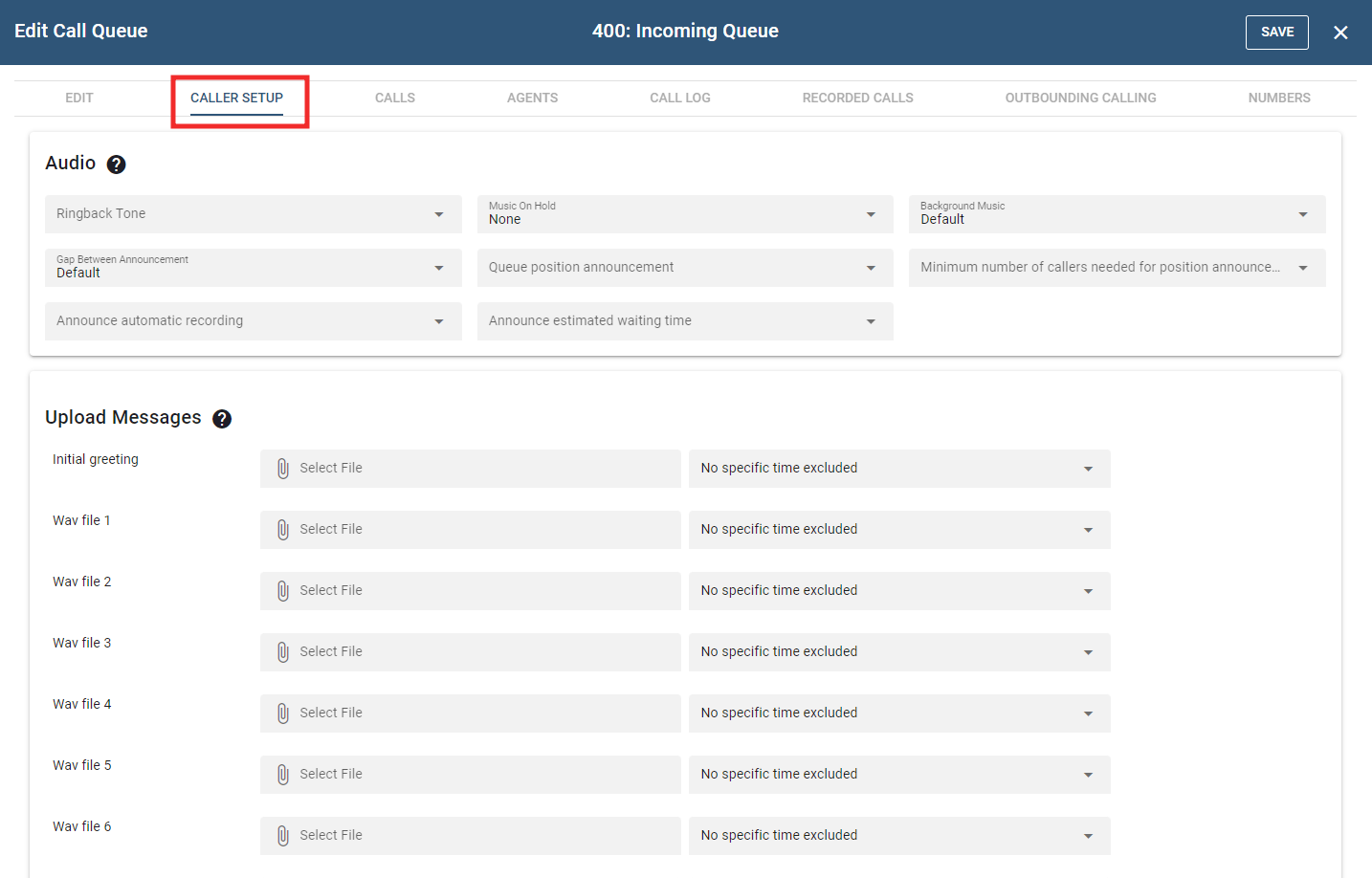
# Audio
- Ringback tone: This setting controls what the caller hears when the agent is being called:
- Regular ringback tone when agent rings: The caller will hear the agent ringing.
- No ringback tone, continue playing music: Instead of hearing a ringback tone, the caller will hear music. If an agent is no longer at his desk but has not logged out of the call queue, the caller will hear music on hold instead of ringback.
- Music on Hold source: From the dropdown list, choose the music that the caller will hear while waiting for an agent.
- Background Music: This setting enables to continue playing the music on hold while playing the messages.
- Gap between announcement(s): From the dropdown list, select the number of seconds that the system should wait between each announcement.
- Queue position announcement: When Announce queue position is selected, an announcement will let callers know their position in queue. This can be done once or periodically, e.g. when the position changes.
- Minimum number of callers needed for position announcement: This setting controls the queue position announcement so that positions are only announced if the queue is busy.
- Announce automatic recording: This flag controls weather the system generates an annoucement about the automatic call recording.
- Announce estimated waiting time: This setting controls whether the caller gets an estimated waiting duration. The value for the waiting time is calculated by the average of the last three callers that were connected. Depending on the number of calls, this value can be only a rough estimate of the actual time.
# Upload Messages
The number of available greetings within any queue is nine. Record only those greetings that should be used. If no greetings are needed, even an initial greeting, don't record any. When recording greetings, you need to assign a number to each greeting; for example, *0 is the entry greeting, *1 is the first greeting, *2 is the second greeting, etc. The number is entered as the last number in the string.
# Callback
Instead of having callers wait in the queue, the system can instead call waiting callers back when it is their turn.
In order to enable this, the queue needs to offer a call back key which will be announced to the caller. The queue will announce the callback possibility when entering the queue either always, never or depending on the expected waiting duration of the caller. Typically only callers that are facing a significant waiting time will use the callback feature.
In order to avoid fraud a dial plan is needed for the callback. The number needs to match with a trunk in the dial plan. This makes it possible to use an existing dial plan or set up a dedicated dial plan for the queue.
When the user presses the selected key, the system will play an IVR that asks the caller to confirm the caller-ID or enter a different caller-ID. For numbers that are not on the dial plan, the system will immediately ask for a different caller-ID until it matches the dial plan. This ensures that only numbers which are on the dial plan will enter the callback list.
When the system calls the number, the system will play back an announcement to the user about the callback and then puts the caller into the queue at the position where the caller would be when juts holding the call. The number of attempts and the waiting duration between the attempts is set with the general outbound calling parameters.
# Post-Call Survey
After the call is over, the system can collect a feedback from the caller. In that case, the agent needs to disconnect the call and the caller needs to stay in the call. There are two ways to receive a feedback. The first one is to redirect the call to an external survey number, for example survey services outside of the system.
The second possibiity is to use the built-in feedback mechanism that asks for a 1 to 5-star rating of the call. The rating will be logged along with the CDR for the call and is available throughout the various reporting mechanisms for the ACD. If the caller leaves a low rating this may trigger a follow-up with the caller. For this the system offers a redirection number, which is typically a manager that will check what went wrong.
# Outbound Calling
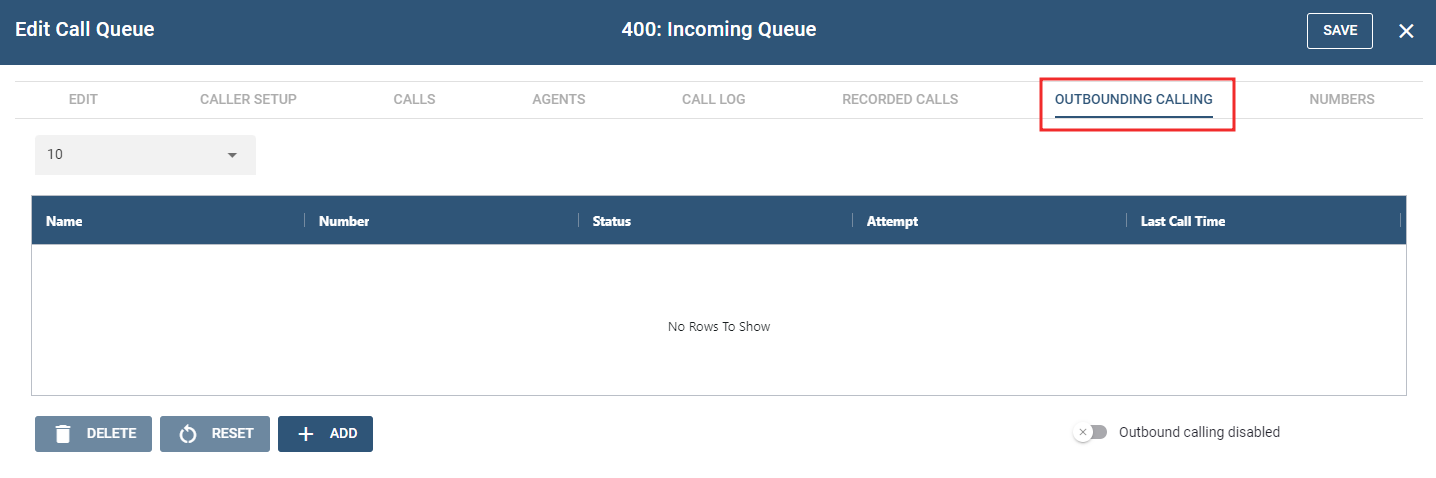
The queue's Outbound Calling page allows the queue admin to set up outbound numbers for agent dialing. Once the outbound numbers have been configured for the queue, users can initiate calling using the ACD outbound calling star code or have the system start the calling
The following settings control how the outbound calling works. Some settings also affect the automatic callback feature.
- Call outbound numbers up and then queue When this flag is set to on, the PBX will call the numbers up without the agents having to dial the star code. Otherwise, the agents need to trigger the call.
- Required number of available agents To make sure that the call will get to an agent, there needs to be a certain number of agents available. This setting controls that.
- Maximum number of retries If the call fails, the PBX will reschedule the number for later and try again. When the number of retries has reached the maximum number the number will be marked as failed.
- Maximum number of waiting callers As with the number of available agents, the number of waiting callers will slow down the calling until the queue has capacity to take an additional call.
- Timeout for connecting calls This setting controls how long the PBX will keep the call ringing until giving up and considering this call attempt failed.
- Key for connecting the call In many cases it is useful to ask the called number to confirm the call to rule out that the call has not reached a mailbox. This setting controls what key to ask for or whether to ask for a key at all.
- Duration between call attempts for a number If a call fails, the system will wait a certain time before trying to call again.
# Caller Options
Caller options allow the caller to exit the queue and connect to another destination. To give the caller this option, use the Caller Options fields to map telephone keypad numbers to other extensions or phone numbers.
| Greeting | Message | Caller Option |
|---|---|---|
| 0 | Welcome to CompanyABC. Your call is important to us. Please hold. | |
| 1 | Sorry our lines are still busy . . . Have you looked at the support site for answer to your question? | |
| 2 | Our newest release offers this and that . . . If you want to leave a message, please press 1 now. | 503 |
| 3 | Another message . . . | |
| 4 | Another message . . . |
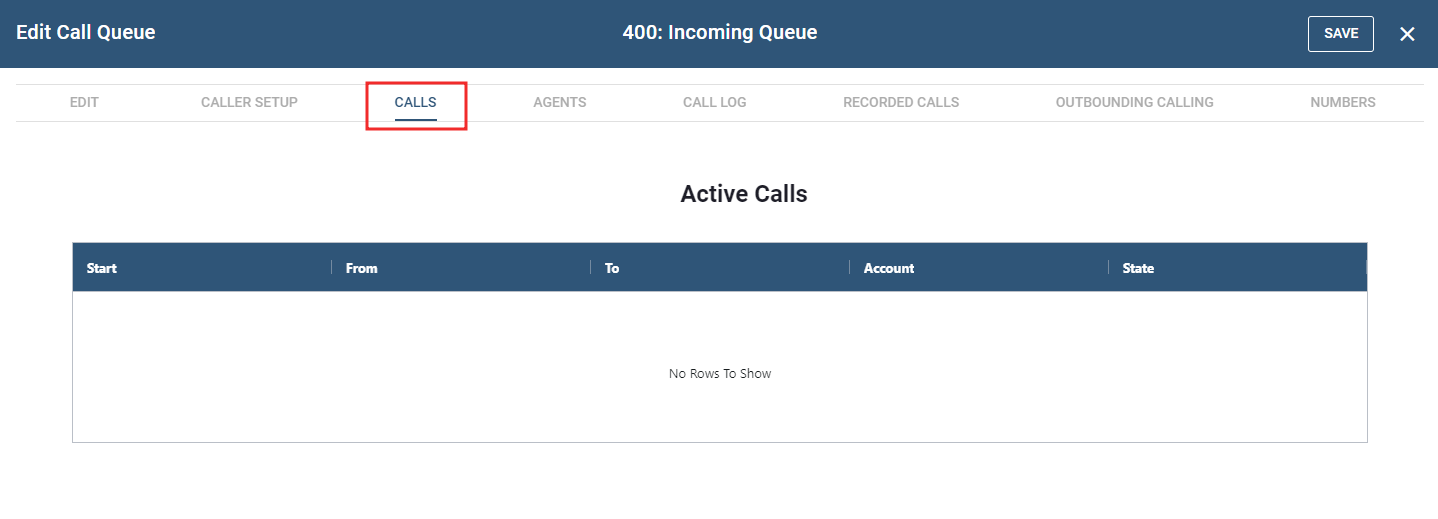
# Calls
Active Calls refer to the calls or communications that are currently in progress or ongoing. This section is valuable for monitoring and providing real-time support for ongoing communication sessions.
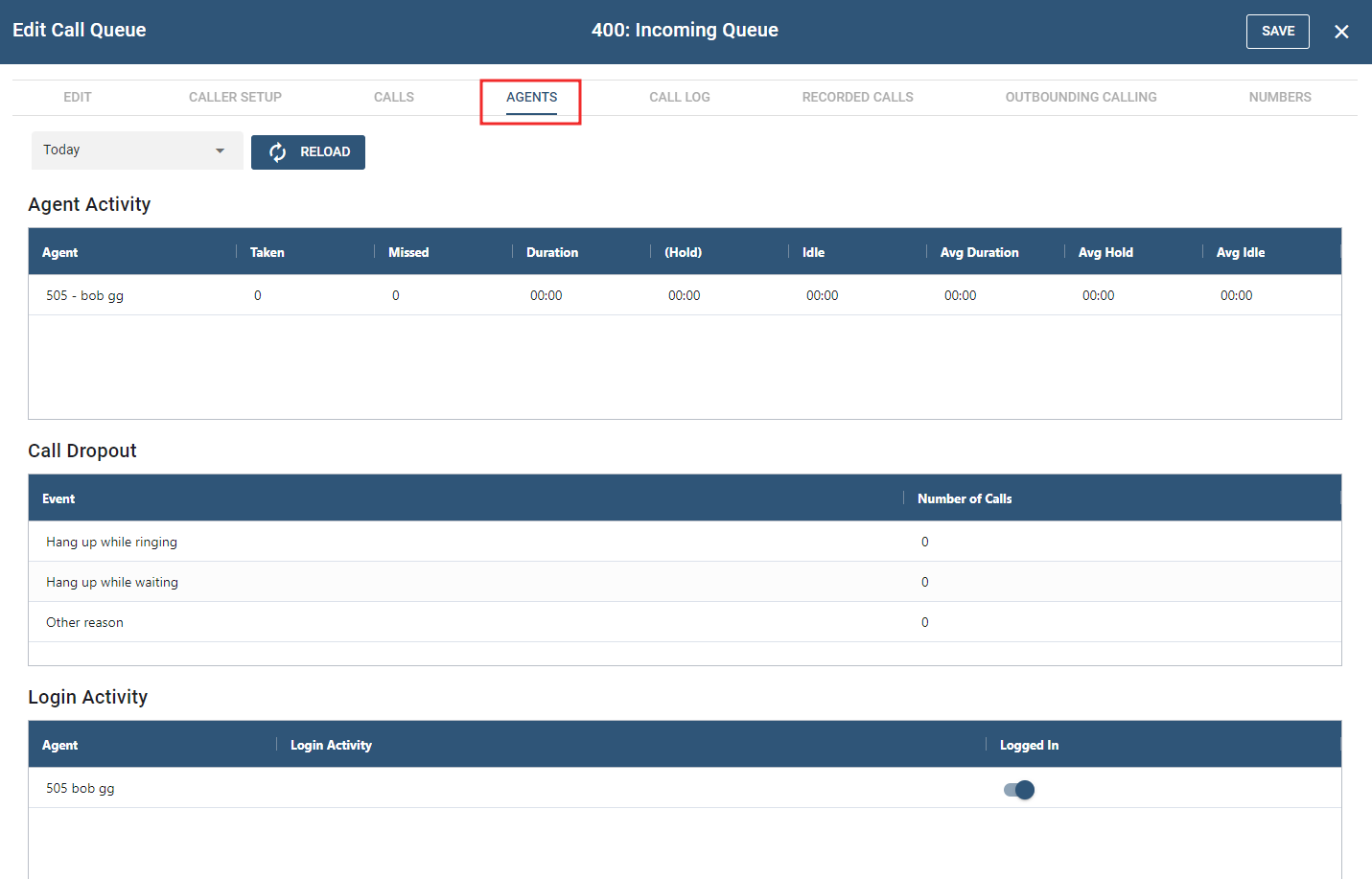
# Agents
This section logs and captures the activities of agent phone calls. While the Active calls may be volatile, meaning their records disappear after the call concludes, the Agents section ensures a persistent record, retaining information even after the call has ended. In addition to call details, this section also includes data on the number of dropped calls and provides insights into login activities as well.
# Call Log
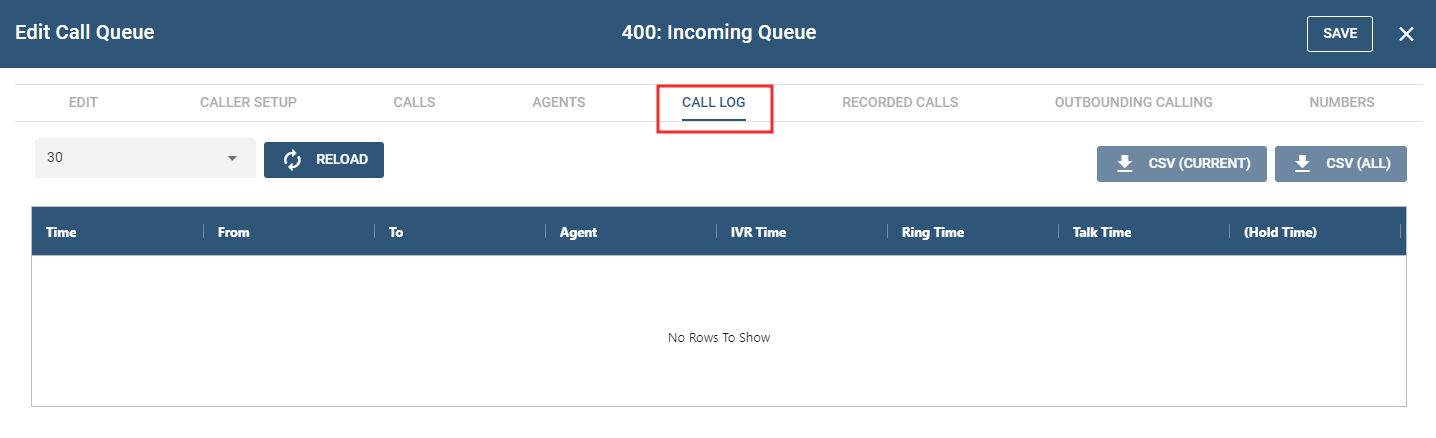
This page shows the list of calls from a specific account. A CSV buttons is available for downloading the list of recordings for the current and all call logged in CSV file format.
# Recorded Calls
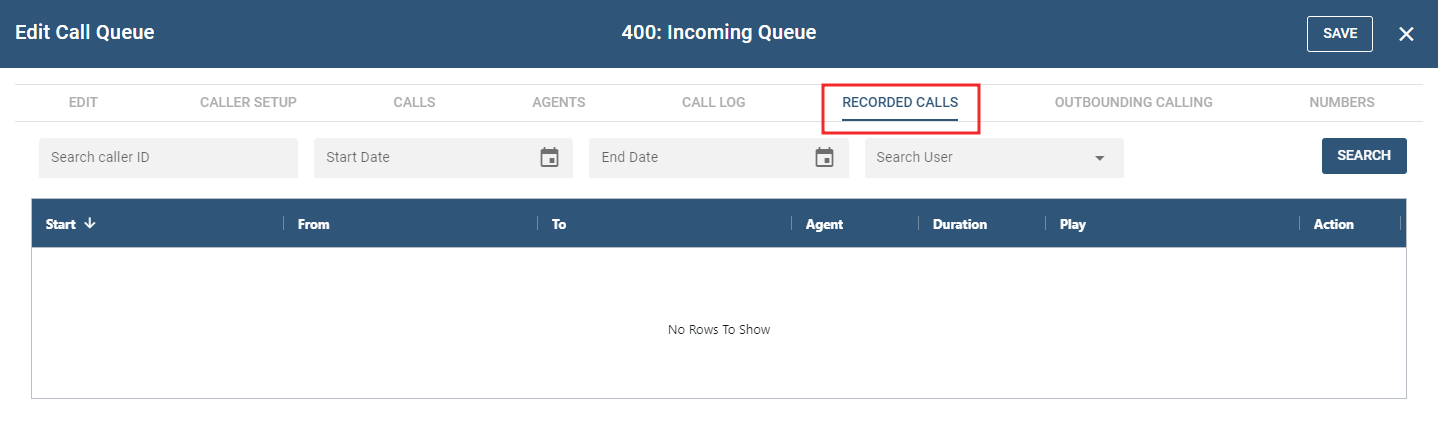
In this section, it provides a compilation of recorded calls from a call queue account. Details regarding the call are documented in the table. The table's contents can be refined by employing the filters above and queried based on caller ID, start and end dates, and username.
# Outbounding Calling
This section collectively provide a list of the outbound calling activities, helping users to track and manage the progress and outcomes of each call.
# Numbers
NOTE: Once any changes are made, click the button to confirm and process the updates.